Streamlined Tagging Experience, Enhanced Search Functionality + 4 more
Streamlined Tagging Experience
We're thrilled to share the latest round of product improvements designed to enhance your workflow and make your experience even smoother. Our development team has been hard at work, and we're excited to highlight the key updates from this week:
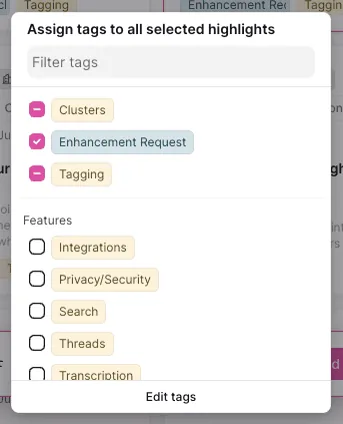
We've introduced several UX enhancements to make manual tagging of highlights faster and more intuitive, especially for teams managing a large number of tags:
- Add/remove multiple highlights: You’ll now see whether all, some, or none of the selected highlights have a particular tag, making it easier to manage and update your tags.
- Group highlights: Tags are now grouped by category (e.g., all competitor tags together) and sorted alphabetically, simplifying your search.
- Scalable tag display: The tags you’ve already selected now appear at the top of the tagging popup, making them easier to find and adjust.
Enhanced Search Functionality 🎉
Our search feature has undergone a total overhaul, making it faster and more powerful. Most notable, you can now search within specific fields using syntax like "tag:" or "creator:", giving you more control over your search results.

AI-Powered Cluster Matching 🎉
We’ve added a new feature that allows you to limit which highlights the AI should consider when adding them to clusters. For example, you can now ensure that “Enhancement request” clusters only include “Enhancement” highlights. This customization applies automatically to all AI-generated clusters, both new and existing.

Compact Recording Player 🎉
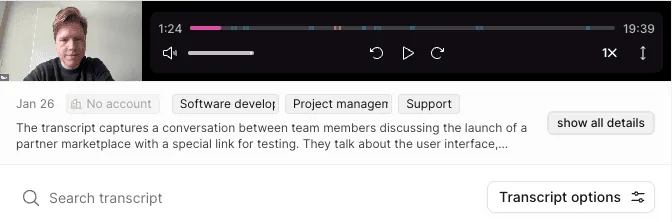
To improve your experience when working with recordings, we've introduced a compact recording player on the recording page. By default, more of the transcript is now visible, making it easier to work with on smaller screens. Don’t worry, you can still maximize the video player if needed.
Pinned Charts for Quick Access 🎉
Navigating through multiple charts just got easier with our new pinning feature. You can now pin specific charts to your overview page, ensuring that your most relevant data is always front and center. Simply click the pin icon on any chart card, and it will be there waiting for you every time you visit your overview.
Mass Upload Text Data via CSV 🎉
We’ve made it easier than ever to get your data into the platform, even without standard integrations:
Users can now mass upload text data via CSV files. Each row in the CSV needs just two columns: title and text. NEXT will then convert each row into a recording, making it incredibly simple to import data, even if your IT department can’t set up an integration.
