Audio- and Video Transcriptions
Overview
NEXT lets you bring all your product discovery data into NEXT in its rawest form; audio or video recordings from customer interactions, text data from surveys or support tickets and more. This "raw data" goes into the "Recordings Library" in NEXT.
Once you uploaded a "recording" to NEXT (audio, video or text), it will get transcribed automatically. Once it's done, NEXT AI will create highlights of key moments, which can be leveraged by the AI chat or simply shared with anyone you like.
How it works
- Navigate to Library > Recordings
- Click Add recording
- Choose Upload file or Import from Zoom/Google
- Select one or more files to upload (audio, video or text)
- Your files will be uploaded and automatically transcribed
- Once the transcription has finished, NEXT AI will automatically created highlights of key moments in your recording
Supported file formats
When you transcribe an audio/video file, make sure the file is:
- In a common audio/video format like MP3, MP4, Ogg, QuickTime, WAV, WebM, etc
- Text files: plain text (.TXT) and Word (.DOCX)
- Less than 4 hours in length
More than 100 supported languages
For files smaller than 1GB, these are the languages we currently support:
Afrikaans
Gaelic
Luxembourgish
Slovak
Albanian
Galician
Macedonian
Slovenian
Amharic
Ganda
Malagasy
Somali
Arabic
Georgian
Malay
Spanish
Armenian
German
Malayalam
Sundanese
Assamese
Greek
Maltese
Swahili
Asturian
Gujarati
Maori
Swati
Azerbaijani
Haitian
Marathi
Swedish
Bashkir
Haitian Creole
Moldavian
Tagalog
Basque
Hausa
Moldovan
Tajik
Belarusian
Hawaiian
Mongolian
Tamil
Bengali
Hebrew
Myanmar
Tatar
Bosnian
Hindi
Nepali
Telugu
Breton
Hungarian
Norwegian
Thai
Bulgarian
Icelandic
Nynorsk
Tibetan
Burmese
Igbo
Occitan
Tswana
Castilian
Iloko
Oriya
Turkish
Catalan
Indonesian
Panjabi
Turkmen
Cebuano
Irish
Pashto
Ukrainian
Chinese
Italian
Persian
Urdu
Croatian
Japanese
Polish
Uzbek
Czech
Javanese
Portuguese
Valencian
Danish
Kannada
Punjabi
Vietnamese
Dutch
Kazakh
Pushto
Welsh
English
Khmer
Romanian
Wolof
Estonian
Korean
Russian
Xhosa
Faroese
Lao
Sanskrit
Yiddish
Finnish
Latin
Serbian
Yoruba
Flemish
Latvian
Shona
Zulu
French
Letzeburgesch
Sindhi
Western Frisian
Lingala
Sinhala
Fulah
Lithuanian
Sinhalese
Important note: for files larger than 1GB, we support fewer languages. Most larger languages should still be supported, but in case you run into issues with your language, feel free to reach out to us via the chat or support@nextapp.co.
Language detection
NEXT analyzes the uploaded file and automatically detects the language in which it should be transcribed. Depending on the accent, length of file, and language, this might at times guess the language wrong. If this happens, follow these steps:
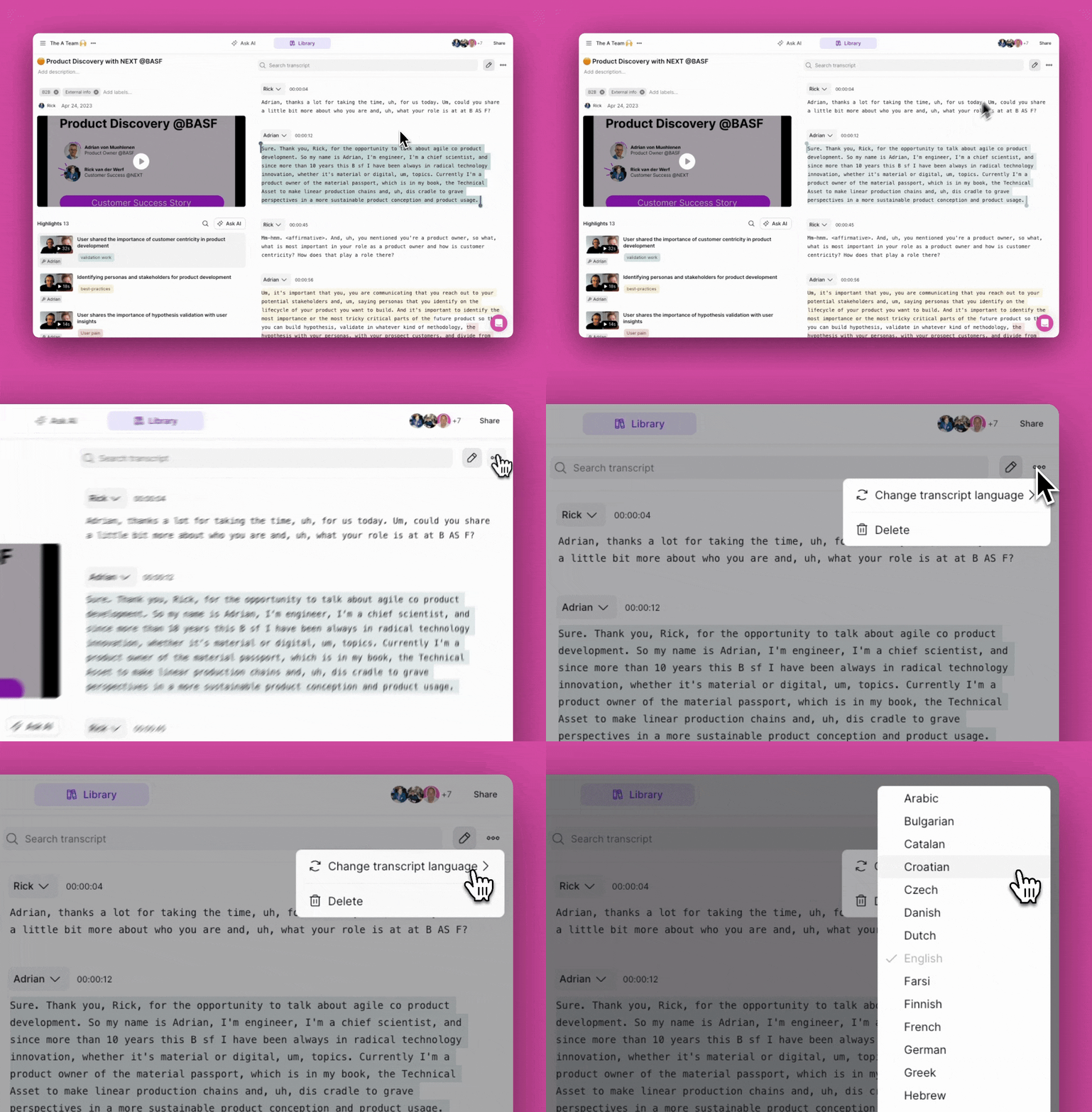
- Open the recording
- Click the three dots [...] above the transcript (right-hand side)
- Click Change transcript language
- Select the language of your choice
- Wait for the transcription to finish
How long does it take to transcribe and analyze my files?
Transcription and analysis time of recordings depend on the language, file size and length of the recording. Besides that, NEXT will use different transcription engines for different languages, file sizes and file lengths.
Most recordings will be transcribed and analyzed in 2-4 minutes. However, there are exceptions, depending on the recording language, length and file size. Here's a quick overview:
- Less than 500MB, any language: ~2-4 minutes
- More than 500MB, English: ~2-4 minutes
- More than 500MB, non-English, any of these languages: ~2-4 minutes
- More than 500MB, all other languages: ~15 minutes
Are you facing an issues where a recording takes significantly longer to transcribe and AI-analyze, or does a recording get "stuck"? That's probably a bug🐞 Reach out to support@nextapp.co or chat with the pink bubble in the bottom right and we'll help you further.